

This API is currently in version 1.0 (BETA). Feel free to contact us if you encounter any problem or to share with us your improvement ideas: [email protected]
What is IABAKO?
IABAKO is the most complete and easy-to-use operational management ERP designed specifically for VSEs (very small enterprises). Orders, Delivery, Quotes, Invoices, Inventory management, it's all there!
This API allows you to access and manage your IABAKO account information (e.g. orders, sales, customers, products). You can therefore create your own integrations by connecting IABAKO to your website, e-commerce, your own CRM or any other system.
Here are a few examples of use cases:
- Import orders from your e-commerce site so that their inventory, delivery, invoicing and tracking are centralized in IABAKO.
- Import customers and their orders from your CRM (or sales tool) to hand over to the operational teams using IABAKO.
- Import your product catalog from another system.
- And much more! Now it's up to you! 😎
Before you get started
Before you start using our API, you must have an account on our platform (web or mobile app):
Also, please note that by using our API, you accept our terms of use and privacy policy.
Authentication
To use our API, you must always provide a JWT token (OAuth2 access_token). This token must be obtained through our authentication service:
To obtain a token, you need to provide your credentials (username and password) in the Authorization header (Basic type) of the authentication service.
These credentials (username and password) are available in your account, in the API Access menu:
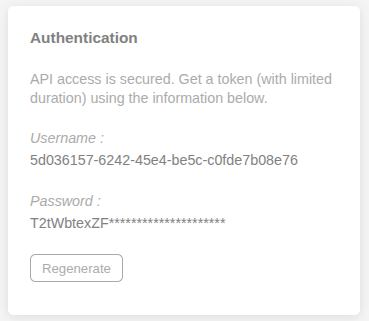
Example of username and password displayed in the API Access menu.
Example of request to the authentication service
Below is an example of a request to the authentication service:
curl --request POST \
     --url https://api.iabako.com/oauth/token \
     --header 'accept: application/json' \
--header 'authorization: Basic <USERNAME_AND_PASSWORD>'You can test the authentication service and retrieve a access_token directly on this documentation site:
- Go to Authentication > Get access token (menu in the left).
- Enter your username and password in the Credentials block (at the top right).
- Click on the Try it button.
Example of authentication service response
If the credentials provided in the Authorization header are correct, the authentication service will respond 200 OK with the following two tokens in the response body:
- access_token: that you can use to make any request to our API. Its validity period is 5 minutes.
- refresh_token: that you can use to retrieve a new pair of tokens (access_token and refresh_token). Its validity period is 30 days.
Below is an example of an authentication service response:
{
    "access_token": "eyJhbGciOiJIUzI1NiIsInR5c...QsYrILE2rRs0Lo",
    "refresh_token": "eyJhbGciOiJIUzI1NiIsInR5...G_ybG-MzjwOEXA"
}
If the credentials provided in the Authorization header are not correct, then the service will respond 401 Unauthorized (without any body).
Example of a resource call
Once the access_token is obtained, you will be able to call any resource of our API. Below is an example of a call for the Customers resource:
- Retrieve the Customer with number 000123 :
curl --request GET \
     --url https://api.iabako.com/customers/number/000123 \
     --header 'accept: application/json' \
     --header 'authorization: Bearer <ACCESS_TOKEN>'
If the access_token is valid and a Customer with number 000123 exists in your IABAKO account, then you will get a 200 OK response with the Customer details in the body:
{
    "externalId": "external-987",
    "number": "000123",
    "customerType": "individual",
    "gender": "man",
    "firstName": "John",
    "lastName": "Doe",
    "email": "[email protected]",
    "address": {
        "zip": "75008",
        "city": "Paris",
        "countryISOCode": "FR"
    },
    "phoneNumber1": "+1 555 123 4567",
    "comment": "Internal note",
    "tags": [
        "Europe",
        "b2c"
    ]
}
Possible error cases:
- If the access_token is not valid, you will get a 401 Unauthorized response (without body).
- If no Customer with number 000123 exists, you will get a 404 Not found response.